Configuring Exchange on-premises for scheduling
The Secure Scheduler for Exchange feature (previously known as VMR Scheduling for Exchange) allows you to create an add-in that enables Microsoft Outlook users in Office 365 or Exchange environments to quickly and easily add a Pexip VMR to their meeting invitations, enabling any meeting to be held over video.
To enable users to schedule meetings in single-use VMRs in an Exchange on-premises environment you must first configure Exchange on-premises appropriately. An overview of the steps is given below; these are described in more detail in the sections that follow.
If your Exchange deployment is fully air-gapped, see also Configuring Exchange Scheduler in an air-gapped environment.
-
Creating a service account. The Pexip InfinitySecure Scheduler for Exchange feature uses a unique service account to log into Exchange.
If you are also using the One-Touch Join feature you cannot use the same service account, because the configuration is different.
-
Configuring Application Impersonation on the service account. This allows the service account to impersonate all users and resources in Exchange.
As an alternative, you can allow the service account to impersonate the Secure Scheduler for Exchange equipment resource only, but this limits the functionality of the feature. For more information, see Using application impersonation.
- Create an equipment resource. This resource is added as an attendee to all meetings scheduled using the Pexip add-in.
- Configure the equipment resource.
- Enable the authentication method used for the service account — basic authentication, NTLM authentication, or Kerberos authentication.
PowerShell commands are provided for all steps; parameters to be replaced with your own relevant information are shown in the format <your info here>.
Prerequisites
Before you start, ensure you have access to your Exchange Admin Center (EAC) web interface, and access to Exchange Management PowerShell.
 Creating a service account
In this step, you create the service account used by the Secure Scheduler for Exchange integration.
Secure Scheduler for Exchange uses a service account to log into Exchange. You can use an existing service account (the same service account can be used by more than one integration), or create a new account.
You need to provide the authentication credentials of this service account when configuring Pexip Infinity to integrate with a Microsoft Exchange deployment.
A single service account can be used by more than one integration.
Changes to the service account may take some time to take effect, depending on the cache lifetime configured on the Microsoft Exchange server.
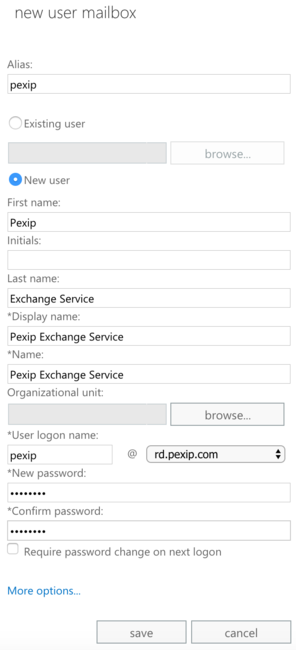
You can create a new service account using either EAC or PowerShell, as follows:
| EAC | PowerShell |
|---|---|
|
The first command lets the administrator type in a password for the service account as a secure string. This password variable is then used in the second command to create a mailbox for the service account. The third command ensures the password of the service account will not expire. $password = Read-Host "Enter password" -AsSecureString New-Mailbox -Name "<Account Name>" -UserPrincipalName "<UPN>" -Password $password -Alias "<Account Alias>" -FirstName "<Account First Name>" -LastName "<Account Last Name>" -DisplayName "<Account Name>" Set-ADUser -Identity "<UPN>" -PasswordNeverExpires $true For example: New-Mailbox -Name "Service Account" -UserPrincipalName pexip@example.com -Password $password -Alias pexip -FirstName Service -LastName Account -DisplayName "Service Account" Set-ADUser -Identity pexip@example.com -PasswordNeverExpires $true |
 Configuring Application Impersonation on the service account
In this step you configure the service account with a Role of Application Impersonation. This allows the service account to impersonate the equipment resource that is used for Secure Scheduler for Exchange, and all users who will be using this service. Alternatively, you can allow impersonation of the equipment resource only, but this limits the functionality of the Secure Scheduler for Exchange feature. For more information, see Using application impersonation.
Impersonating all users and resources
The Secure Scheduler for Exchange service impersonates users when sending email updates containing joining instructions (in cases where these instructions could not be added at the time of scheduling). This makes it appear to the recipients that the joining instructions were sent from the meeting organizer, instead of the service account. The service account also impersonates the Secure Scheduler for Exchange equipment resource to read the calendar.
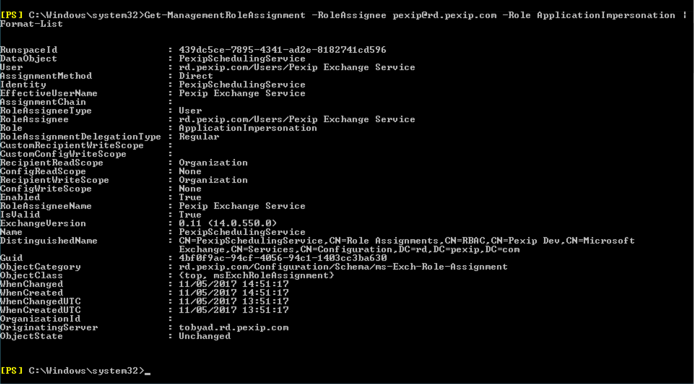
To check if your service account has Application Impersonation already configured, use the PowerShell command:
Get-ManagementRoleAssignment -RoleAssignee "<email_of_service_account>" -Role ApplicationImpersonation | Format-List
Below is an example of the output of the command when the service account already has Application Impersonation configured:
If the service account does not have Application Impersonation configured, then the above command will not return anything at all. If this is the case, enable Application Impersonation as follows:
New-ManagementRoleAssignment -name:"<role_name>" -Role:ApplicationImpersonation -User:"<email_of_service_account>"
For example:
New-ManagementRoleAssignment -name:PexipSchedulingService -Role:ApplicationImpersonation -User:pexip@exchange.example.com
This enables the service account to impersonate all users and resources in the organization.
For more information on these commands, see Microsoft help:
- Configuring Application Impersonation: https://msdn.microsoft.com/en-us/library/office/dn722376%28v=exchg.150%29.aspx
- Get-ManagementRoleAssignment command: https://technet.microsoft.com/en-us/library/dd351024(v=exchg.150).aspx
- New-ManagementRoleAssignment command: https://technet.microsoft.com/en-us/library/dd335193(v=exchg.150).aspx
- Set-ManagementRoleAssignment command (used if you need to edit the role assignment): https://technet.microsoft.com/en-us/library/dd335173(v=exchg.150).aspx
Impersonating resources only
If you do not want to permit the service account to access all users and resources in your organization, you can instead permit it to access the Secure Scheduler for Exchange equipment resource only, but this limits the functionality of the feature. For more information, see Using application impersonation.
To do this, you must first create the equipment resource and assign it an email address.
Then use the following PowerShell command:
$restriction_filter = "UserPrincipalName -eq ""<email_of_equipment_resource>"""
$scheduling_service_account = "<email_of_service_account>"
$management_scope_to_create = "Pexip Scheduling Management Scope"
$impersonation_role_name_to_create = "Pexip Scheduling Impersonation"

New-ManagementScope -Name $management_scope_to_create -RecipientRestrictionFilter $restriction_filter

New-ManagementRoleAssignment -Name $impersonation_role_name_to_create -Role ApplicationImpersonation -User $scheduling_service_account -CustomRecipientWriteScope $management_scope_to_create
Creating an equipment resourceIn this step you create an equipment resource used by Secure Scheduler for Exchange. This resource is added as an attendee to all meetings scheduled using the Pexip add-in. The scheduling service monitors the equipment resource's mailbox, processes all meeting requests sent to it, and schedules the meetings as appropriate.
The equipment resource is added as a resource attendee to all Secure Scheduler for Exchange meetings. Users will see replies from this resource when it accepts or rejects a meeting request.
Each equipment resource can be used by only one Secure Scheduler for Exchange Integration. If you have separate test and development environments, you must use a different equipment resource for each.
Previously we recommended using a room resource, but this may cause issues when using the Room Finder tool. Thus, we now recommend using an equipment resource.
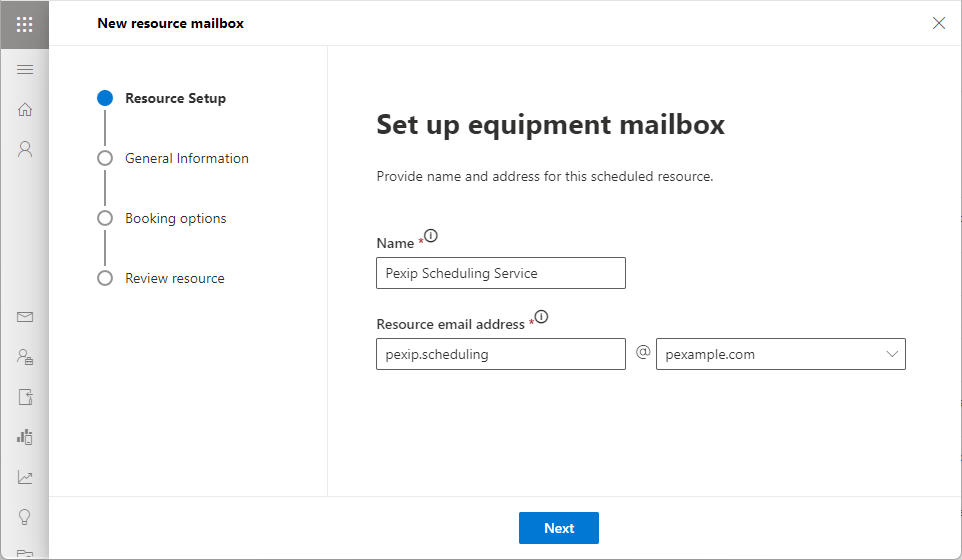
You can create an equipment resource using either EAC or PowerShell, as follows:
| EAC | PowerShell |
|---|---|
|
This command creates an equipment resource with the specified Name, Alias and Display Name. Name and Display Name should be the same, and will appear as the location of any meeting requests, and as a recipient. The Alias (also known as the mail nickname) is used as the email address. New-Mailbox -Equipment -Name "<Equipment Name>" -Alias "<Equipment Alias>" -DisplayName "<Equipment Name>" For example: New-Mailbox -Equipment -Name "Pexip Scheduling Service" -Alias pexip.scheduling -DisplayName "Pexip Scheduling Service" |
 Configuring the equipment resource
In this step you configure calendar processing to disable automatic processing for the equipment resource, so that the processing can be done by the scheduling service. You must also configure it to permit conflicts, because meetings may be scheduled at the same time by different users. You can optionally hide the resource mailbox's availability to improve the usability of the Scheduling Assistant.
Calendar processing
This configuration is done using the following PowerShell command:
Set-CalendarProcessing -Identity "<email_of_equipment_resource>" -AutomateProcessing None -AllowConflicts $true -BookingWindowInDays 1080 -MaximumDurationInMinutes 0 -AllowRecurringMeetings $true -EnforceSchedulingHorizon $false -ScheduleOnlyDuringWorkHours $false -ConflictPercentageAllowed 100 -MaximumConflictInstances 2147483647
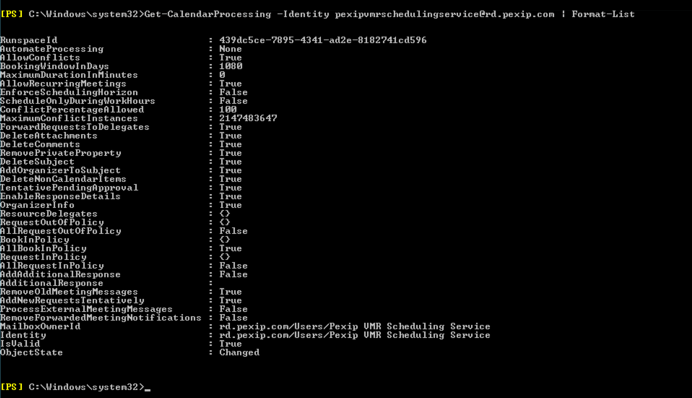
To verify that the above command has configured everything correctly, use the PowerShell command:
Get-CalendarProcessing -Identity "<email_of_equipment_resource>" | Format-List
The output should look something like this:
Hiding resource availability in scheduling assistant
When viewing meetings in Outlook's Scheduling Assistant, the equipment resource and its availability will appear in the list of attendees. Because the same equipment resource is used for all scheduled meetings, it may show as unavailable if there are other meetings scheduled at the same time, which may be confusing to users.
To avoid this, you can hide the availability of the equipment resource's mailbox, so that it is always shown as "unknown". This is done using the PowerShell command:
Set-MailboxFolderPermission -Identity "<email_of_equipment_resource>:\Calendar" -User Default -AccessRights None
More information
For more information on these commands, see Microsoft help:
- Set-CalendarProcessing command: https://learn.microsoft.com/en-us/powershell/module/exchange/set-calendarprocessing
- Get-CalendarProcessing command: https://learn.microsoft.com/en-us/powershell/module/exchange/get-calendarprocessing
-
Set-MailboxFolderPermission command: https://learn.microsoft.com/en-us/powershell/module/exchange/set-mailboxfolderpermission
Enabling authenticationIn this step you enable your Exchange on-premises deployment to support your chosen authentication method for the service account. Secure Scheduler for Exchange uses basic authentication by default, but you can elect to use NTLMv2 authentication or Kerberos authentication instead.
For all forms of authentication, Pexip Infinity stores the credentials in encrypted form. We recommend that your service account user has a strong and unique password.
For Basic and NTLM authentication, all authentication is carried out over a secure TLS channel. For Kerberos, authentication messages are sent in plain text but Kerberos tickets are encrypted using the service account password. Depending on the security requirements of your organization, you may wish to enable the Kerberos KDC HTTPS proxy, in which case all Kerberos Authentication messages are sent over a secure TLS channel.
Basic authentication
If you are using basic authentication with on-prem Exchange you need to ensure it is enabled for Exchange Web Services (EWS).
You can do this using either Windows Service Manager or PowerShell, as follows:
| Windows Service Manager | PowerShell |
|---|---|
|
This command enables basic authentication for EWS on a specific server: Set-WebServicesVirtualDirectory -Identity "<server>\EWS (Default Web Site)" -BasicAuthentication $true For example, if your server name is PEXCHANGE then: Set-WebServicesVirtualDirectory -Identity "PEXCHANGE\EWS (Default Web Site)" -BasicAuthentication $true |
NTLMv2 authentication
In most on-premises Exchange deployments, NTLMv2 authentication is enabled by default. To confirm that it is enabled in your environment:
- Open Server Manager and select the server on which Exchange is installed.
- From the top right options select Tools > Local Security Policy.
- On the tree on the left, expand Local Policies then select Security Options.
- Scroll down to Network security: Restrict NTLM: Incoming NTLM traffic.
- Ensure this is either left to the default value of Not Defined, or set to Allow All.
Kerberos authentication
Kerberos authentication is enabled by default in Windows and you should not need to do anything specific to use it.
Pexip Infinity supports Kerberos KDC in Active Directory on Windows server 2012 R2 and newer.
We strongly recommend that Kerberos Pre-Authentication is enabled on the service account. On most Windows systems this should already be enabled by default.
When configuring Pexip Infinity to
- the Kerberos realm is usually your Exchange domain, in upper case
- the Kerberos KDC (key distribution center) is usually your Active Directory server.
You can optionally use Kerberos over TLS; to do so you must enable and configure the KDC Proxy on your Windows server and then enable and configure use of the proxy on your
Pexip Infinity supports the following encryption types for Kerberos:
- aes256-cts-hmac-sha384-192
- aes128-cts-hmac-sha256-128
- aes256-cts-hmac-sha1-96
- aes128-cts-hmac-sha1-96
Viewing the equipment resource's mailbox
There may be occasions, such as when troubleshooting, that you want to view the equipment resource's mailbox or calendar. To do this, you first need to assign full access to the equipment resource's mailbox to a delegate account, and then view the mailbox or calendar using the delegate account. (The delegate account could be
Next steps
- Configuring Pexip Infinity to integrate with your Microsoft Exchange deployment and create the Secure Scheduler for Exchange add-in.
- Making the add-in available to users within your Microsoft Exchange deployment.