Postman API access via OAuth2
Accessing the API via OAuth2 requires the following flow:
- A bearer token must be requested via the /oauth/token/ endpoint
- This bearer token is then used to access the API, i.e. GET /api/admin/status/v1/alarm/
You can configure Postman to do this by using a pre-request script; the details are below.
- Create an API client
- Set up a Postman environment
- Set up a Postman collection
- Configure the collection
- Create a request
- Troubleshooting
Create an API client
Log in to the Management Node and create an API client.
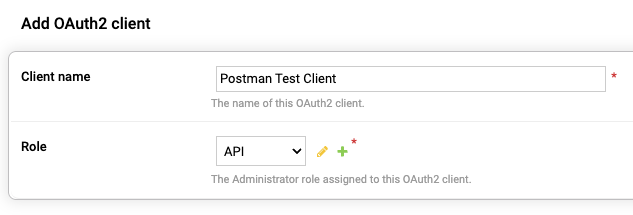
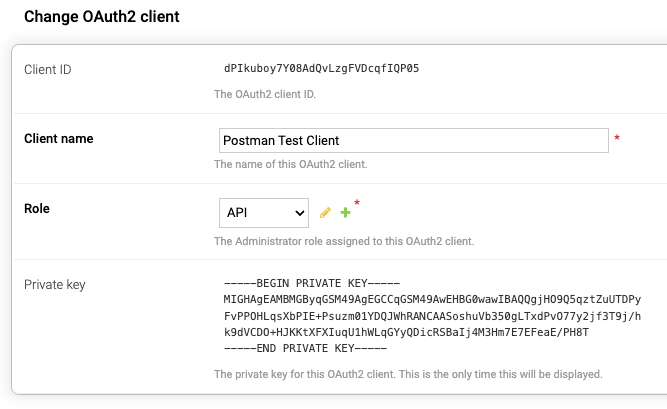
Make a note of the Client ID and the Private Key.
Set up a Postman environment
- In Postman select .
- Give it a name.
- Add the following variables:
| Variable | Type | Value |
|---|---|---|
| host | default | mgmt.domain.com |
| pmlib_code | default | See postman-util-lib |
| client_id | default | <client_id> |
| client_private_key | secret | <client_private_key> |
| jwt_signed | secret | |
| access_token | secret | |
| expires | default | |
| scope | default |
The host value must match the host value of a valid OAuth2 endpoint listed under OAuth2 Endpoints on the About page on the Management Node.
Set up a Postman collection
- In Postman select .
- Give it a name.
- Set the environment you created above to this collection.
Configure the collection
- Select the collection you created above.
-
Enter the following in the Authorization tab.
- Auth Type: Bearer Token
- Token: {{access_token}}
- Open Scripts > Pre-request.
- Input the following script:
// ]pexip[
//
// Pre-request postman script for requesting a bearer token to access the API via OAuth2
//
// Documentation: https://docs.pexip.com/admin/managing_API_oauth.htm
//

// Imports
const crypto = require("crypto-js");
eval(pm.environment.get('pmlib_code'));

// Set Access token expiration (in seconds)
// Set this to match the configuration on Pexip;
//  - Administrator Authentication > Management API OAuth2 settings > Access token expiration
const token_expiration = 3600

// Get environment variables
var mgmt = pm.environment.get('host');
var clientId = pm.environment.get('client_id');
var clientPrivateKey = pm.environment.get('client_private_key');

// Set JWT header
var header = {
    'alg': 'ES256',
    'typ': 'JWT'
};

// Prepare timestamp in seconds
const timestampCurrent = Math.floor(Date.now() / 1000)
const timestampExpiry = timestampCurrent + token_expiration

// Set JWT payload
var payload = {
    'sub': clientId,
    'iss': clientId,
    'aud': 'https://'+mgmt+'/oauth/token/',
    'iat': timestampCurrent,
    'exp': timestampExpiry,
    'jti': crypto.lib.WordArray.random(36).toString()
};

// Sign the JWT using the pmlib.rs* library (https://joolfe.github.io/postman-util-lib/)
var JWS = pmlib.rs.jws.JWS;
signedJWS = JWS.sign(header.alg, header, payload, clientPrivateKey);
pm.environment.set('jwt_signed', signedJWS);

// Check if we have a bearer token
var token_exists = pm.environment.get('access_token') || '';

var token_expiry = pm.environment.get('expires') || '';
const token_expiry_date = new Date(token_expiry * 1000);

// Check if the token is valid
const diff = token_expiry - timestampCurrent;
if (diff > 0) {
    // Bearer token is still valid
    console.log('Bearer token still valid (Expires: '+token_expiry_date.toLocaleString('en-GB', { timeZone: 'UTC' })+' (UTC))');
} else {
    // Bearer token has expired
    console.log('Bearer token expired ('+token_expiry_date.toLocaleString()+' (UTC)), requesting new token');
    // Request a bearer token
    const postRequest = {
    url: 'https://'+mgmt+'/oauth/token/',
    method: 'POST',
    header: {
        'Content-Type': 'application/x-www-form-urlencoded; charset=UTF-8',
    },
    body: {
        mode: 'urlencoded',
        urlencoded : [
            { key: 'grant_type', value: 'client_credentials' },
            { key: 'client_assertion_type', value: 'urn:ietf:params:oauth:client-assertion-type:jwt-bearer' },
            { key: 'client_assertion', value: signedJWS },
            { key: 'scope', value: 'is_admin use_api' },
        ]
    },
    };
    pm.sendRequest(postRequest, (error, response) => {
        console.log(error ? error : response.json());

        // Set/update environment variables
        jsonData = response.json()
        if (!jsonData.error){
            pm.environment.set('access_token', jsonData.access_token);
            pm.environment.set('expires', timestampExpiry);
            pm.environment.set('scope', jsonData.scope);
            console.log('New access token: '+jsonData.access_token)
        }
    });
}
Create a request
For this example request, we’ll use the alarm status endpoint:
- Select the collection you created above.
- Select .
- Give it a name.
- Enter the following for the host: https://{{host}}/api/admin/status/v1/alarm/
- Submit the request.
Troubleshooting
400 Response
{error: "invalid_client"}
Things to check:
- Confirm that the client_id is correct.
- Confirm that the client_private_key is correct.
-
Confirm that the OAuth2 client has the correct permissions for the endpoint.
You can read more about the roles at Managing API access via OAuth2. The roles map to the scope. The minimum roles for a client are is_admin use_api, but this only permits base access.
- Confirm that the host value matches a value listed on the about page on the management node (https://mgmt.domain.com/admin/platform/about/)
Here is an example collection and an environment file to import into Postman.