Integrating Skype for Business with Pexip Infinity
Pexip Infinity allows Microsoft Skype for Business users to meet with other people regardless of the system they are using – Skype for Business, web browsers or traditional video conferencing systems. All participants can enjoy wideband audio, high definition video and cross-platform presentation sharing.
It can be integrated with SfB as part of an existing, on-premises SfB environment inside an enterprise network, or as a standalone Pexip environment deployed in a public DMZ that enables direct federation with remote SfB environments, or as a hybrid deployment where SfB users may be homed either on-premises or in Office 365.
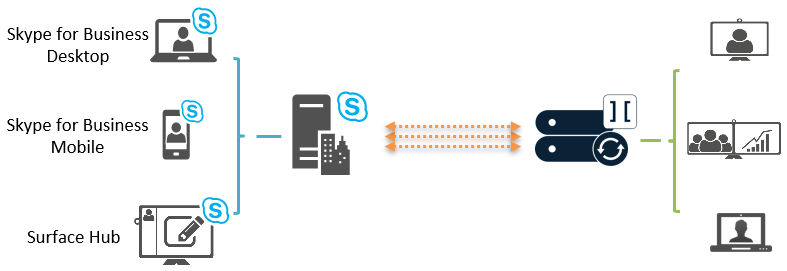
Pexip Infinity enables full interoperability between Microsoft's H.264 SVC/RDP and H.263, H.264, VP8 (WebRTC) and BFCP/H.239 for truly seamless video and content sharing in any-to-any configurations, such as multiparty conferences.
In addition to enabling SfB participants to join conferences hosted on Pexip Infinity, Pexip Infinity can act as a gateway between SfB and standards-based endpoints. This enables SfB clients to receive and initiate point-to-point calls with H.323/SIP endpoints and registered Pexip apps, and invite those devices into a SfB meeting while retaining the native meeting experience on each device.
Architecture overview
Pexip Infinity can be integrated with SfB in three ways:
- As part of an existing, on-premises SfB environment inside an enterprise network (referred to in this guide as on-premises deployment).
- As a standalone Pexip environment deployed in a public DMZ, leveraging direct federation with remote SfB environments (referred to in this guide as a public DMZ deployment).
- As a hybrid deployment which is a mix of on-premises and Office 365 deployments where users may be homed in either environment. A hybrid deployment has the same configuration requirements as a public DMZ deployment.
You will typically choose one of these methods, depending on requirements and preference. Each deployment method has a set of prerequisites and configuration steps which are covered in detail in the relevant sections of this guide.
On-premises deployment
To integrate Pexip Infinity with an existing, on-premises SfB environment, one or more SIP domains are statically routed from the SfB environment towards one or more Pexip Infinity Conferencing Nodes. Then, when a SfB user dials a conference alias, such as meet.john@vc.example.com, or the alias of a standards-based endpoint, the user is placed into the appropriate Pexip-hosted conference. The SfB user can also pin one or more such aliases to their contact list for easy access later.
Pexip Infinity supports routing on the same domain as the main SfB installation, or a different domain/subdomain. If the same domain is used, Pexip Infinity services (such as a Virtual Meeting Room), or standards-based endpoints, cannot have a URI that is already in use by a SfB-enabled user in Active Directory. For example, if a user's SfB URI is john@example.com this could not be used as their VMR alias; however meet.john@example.com could be used.
An on-premises deployment can also provide access to Pexip Infinity services for clients located on the public internet. Here is an example deployment scenario for a separate VTC subdomain (vc.example.com) that provides B2B support for standards-based devices, federated B2B support for external SfB clients, and support for remote corporate SfB clients:
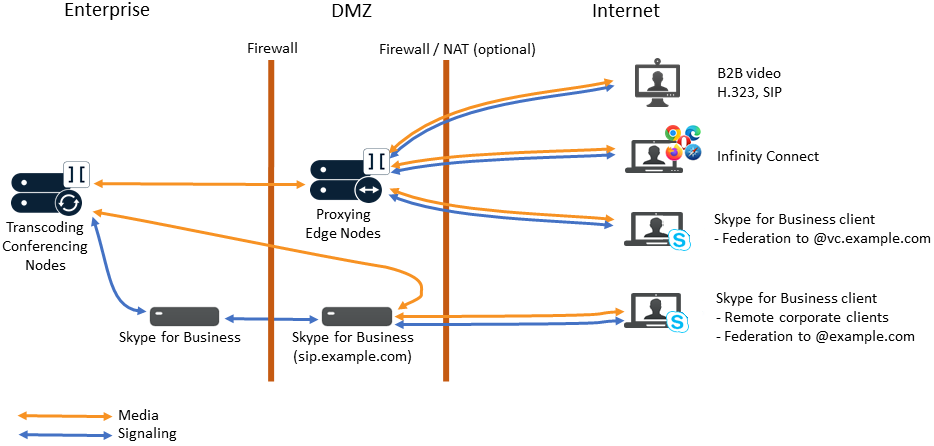
In this deployment scenario:
- Federated SfB calls to the Pexip Infinity video subdomain (e.g. @vc.example.com) are routed through Proxying Edge Nodes
- Remote corporate SfB clients are routed through your SfB Edge server as normal, but they can also make gateway calls to the Pexip Infinity video subdomain (e.g. @vc.example.com) — in which case media is routed through the SfB Edge server providing the internal Transcoding Conferencing Node can route to the public facing interface of the SfB Edge server (otherwise a TURN server is required).
- Federated calls to your SfB domain (e.g. @example.com) are routed through your SfB Edge server as normal.
- Any external Pexip apps (WebRTC and RTMP), SIP and H.323 endpoints and other forms of business-to-business video calls are routed through Proxying Edge Nodes. These calls can be gatewayed via Pexip Infinity to SfB clients or SfB meetings if required (see Using Pexip Infinity as a Skype for Business gateway for more information).
For full information on configuring Pexip Infinity with on-premises SfB, see Example deployment in an on-premises Skype for Business environment.
Public DMZ / hybrid deployment
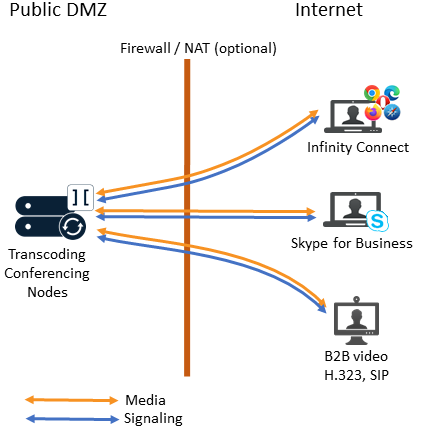
As Pexip Infinity supports SfB natively, it can be deployed to enable SfB interoperability without having any existing, on-premises SfB infrastructure. In such a deployment, Pexip Infinity can federate directly with remote SfB environments (on-premises environments as well as SfB Online/Office 365), without the need for a local SfB environment.
In this mode, Pexip Infinity can be deployed in a single datacenter, or if desired, multiple geographically-dispersed datacenters, optionally leveraging call control and/or GeoDNS functionality for ensuring optimal/shortest path signaling and media routing across public networks.
If required, Pexip Infinity nodes can be deployed in a DMZ behind a static NAT firewall. The diagram (right) shows an example deployment scenario that also includes B2B support for standards-based devices.
When integrating with a hybrid deployment of SfB, where users may be homed either on-premises or in Office 365, you should follow the same configuration guidelines as for a public DMZ deployment.
For full information, see Example public DMZ / hybrid deployment for remote Skype for Business environments.