Initiating RTMP streaming from Skype for Business clients
Skype for Business clients can use the Infinity Gateway service to dial out to an RTMP streaming or recording service.
This allows those SfB clients to initiate a dedicated RTMP multimedia stream to enterprise CDN (Content Delivery Network) streaming and recording services such as Wowza, Quickchannel, Qumu, VideoTool, and Microsoft Stream, and to public streaming services such as YouTube and Facebook.
To do this, you must:
- Set up the streaming service and obtain the address to which the video stream will be sent (see Integrating with streaming and recording services for more information).
-
Set up a Call Routing Rule on Pexip Infinity that will match the contact address dialed from the SfB client and then call out to the streaming service.
The contact address dialed from the SfB needs to be based upon (but not the same as) the streaming URL as it must be in a format dialable from the SfB client (avoiding : and / characters). The routing rule will then transform the dialed address into the streaming URL and initiate the call over RTMP. By using suitable regular expressions (regexes), you can make your rule re-usable for future streaming URLS to the same service.
-
You can then supply the appropriate address to the SfB users that they can use to dial out to the streaming service.
For streaming services that always use a different stream name for every recording, you will have to provide the user with the address each time. If the streaming service supports a persistent URL (such as with YouTube) they could add the address as a SfB contact for regular use.
See Using Pexip Infinity as a Skype for Business gateway for complete information about how to configure the Infinity Gateway to integrate with Skype for Business.
Example streaming to YouTube
Let's assume that:
- The YouTube streaming URL is: rtmp://a.rtmp.youtube.com/live2/qtr9-c85x-dxmw-av4t
-
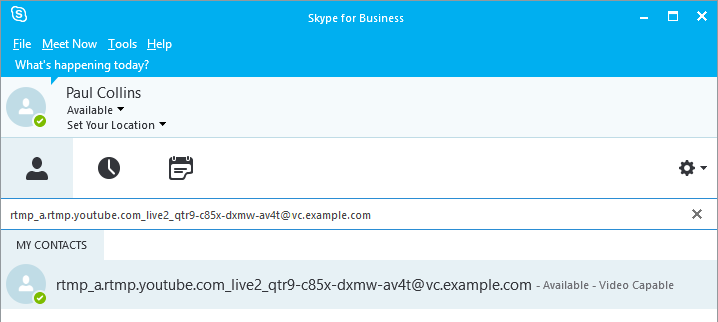
The address to be called from the SfB client is: rtmp_a.rtmp.youtube.com_live2_qtr9-c85x-dxmw-av4t@vc.example.com
i.e. it is in the format rtmp_<resource portion of the URL with / characters converted to _ characters>@<SIP domain routed to Pexip Infinity>
Your Call Routing Rule on Pexip Infinity should be configured like this:
| Option | Description |
|---|---|
| Incoming gateway calls | Ensure this option is selected. |
| Outgoing calls from a conference | Leave unselected. |
| Match Infinity Connect (WebRTC / RTMP) Match SIP Match Skype for Business (MS-SIP) Match H.323 Match Teams |
Select Match Skype for Business (MS-SIP) and leave the other protocols unselected. (This rule is only handling call requests received from the SfB environment.) |
| Match against full alias URI | Leave unselected. |
| Destination alias regex match |
Enter a regular expression that will match the format of the streaming address received from the SfB environment and uses match groups to allow the address elements to be rebuilt in the replace string. For example: rtmp_([a-z]\.rtmp\.youtube\.com)_(live.*)_(.+)@vc\.example\.com This expression matches:
See Regular expression (regex) reference for more information on using regular expressions and Pexip Infinity's inbuilt regex testing tool. |
| Destination alias regex replace string |
The replace string must build the streaming URL to be dialed from Pexip Infinity, based on the elements extracted into match groups from the addressed dialed from the SfB client. For example: rtmp://\1/\2/\3 This builds the streaming URL based on "rtmp://" followed by match group 1, followed by "/" followed by match group 2, followed by "/" followed by match group 3. |
| Protocol | Select RTMP (streaming). |
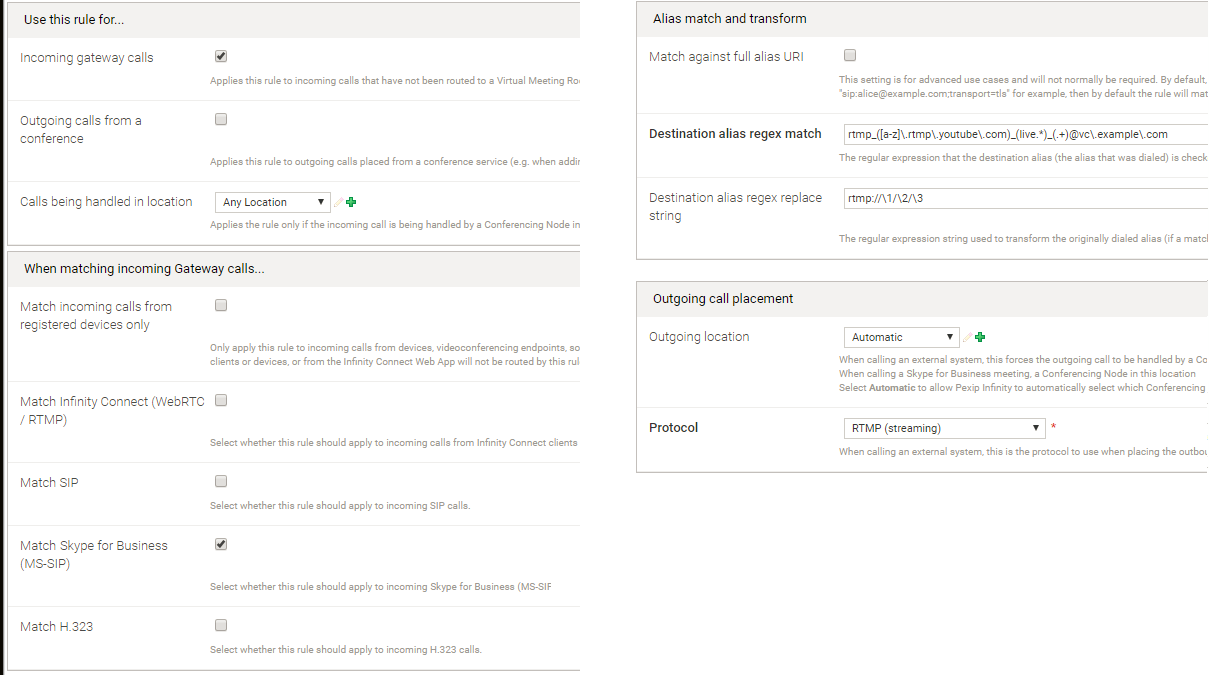
You can then call the alias from within the SfB client:
YouTube addresses with less variation
If your YouTube streaming URL addresses are more predictable, you can simplify your rule's alias regex matching logic. For example, if the streaming URLs always start rtmp://a.rtmp.youtube.com/live2/ you could use:
- SfB addresses in the format: youtube_<stream_name>@vc.example.com for example youtube_qtr9-c85x-dxmw-av4t@vc.example.com
- The rule would then match against: youtube_([-a-z0-9]+)@vc\.example\.com
- The replace string would be: rtmp://a.rtmp.youtube.com/live2/\1