Pexip Infinity and Skype for Business integration features
Pexip Infinity enhances the feature set of Microsoft Skype for Business by providing users with their own personal Virtual Meeting Room that is available at all times, and can be used for ad hoc and scheduled meetings for any number of people.
In addition, Pexip Infinity can be used as a direct gateway between any two users, regardless of device or technology. As a gateway, Pexip Infinity enables users to join from any system to a SfB meeting. This allows non-Microsoft users with anything from web browsers to traditional group videoconferencing systems to join a SfB meeting just like any Skype for Business user.
Pexip's tight integration with SfB includes features such as simulcasting and multistreaming — see the full list of supported codecs, protocols, resilience and interoperability features.
This topic also provides specific SfB-related information on resource allocation, how to control media capabilities, and integration limitations.
Pexip Infinity as a Skype for Business gateway
Pexip Infinity can act as a gateway between SfB and standards-based endpoints. This enables SfB clients to:
- invite H.323/SIP endpoints and registered Pexip apps into a SfB meeting via manual dialout or drag and drop from the contacts list
- use the Infinity Gateway to route incoming calls directly into an ad hoc or scheduled SfB meeting
- when dialed into a Pexip VMR conference, invite other SfB or external contacts into that same Pexip VMR (this creates a new SfB meeting which is merged with the existing Pexip VMR)
- receive and initiate person-to-person calls with standards-based devices, and then optionally add other participants (to escalate to a multipoint SfB meeting).
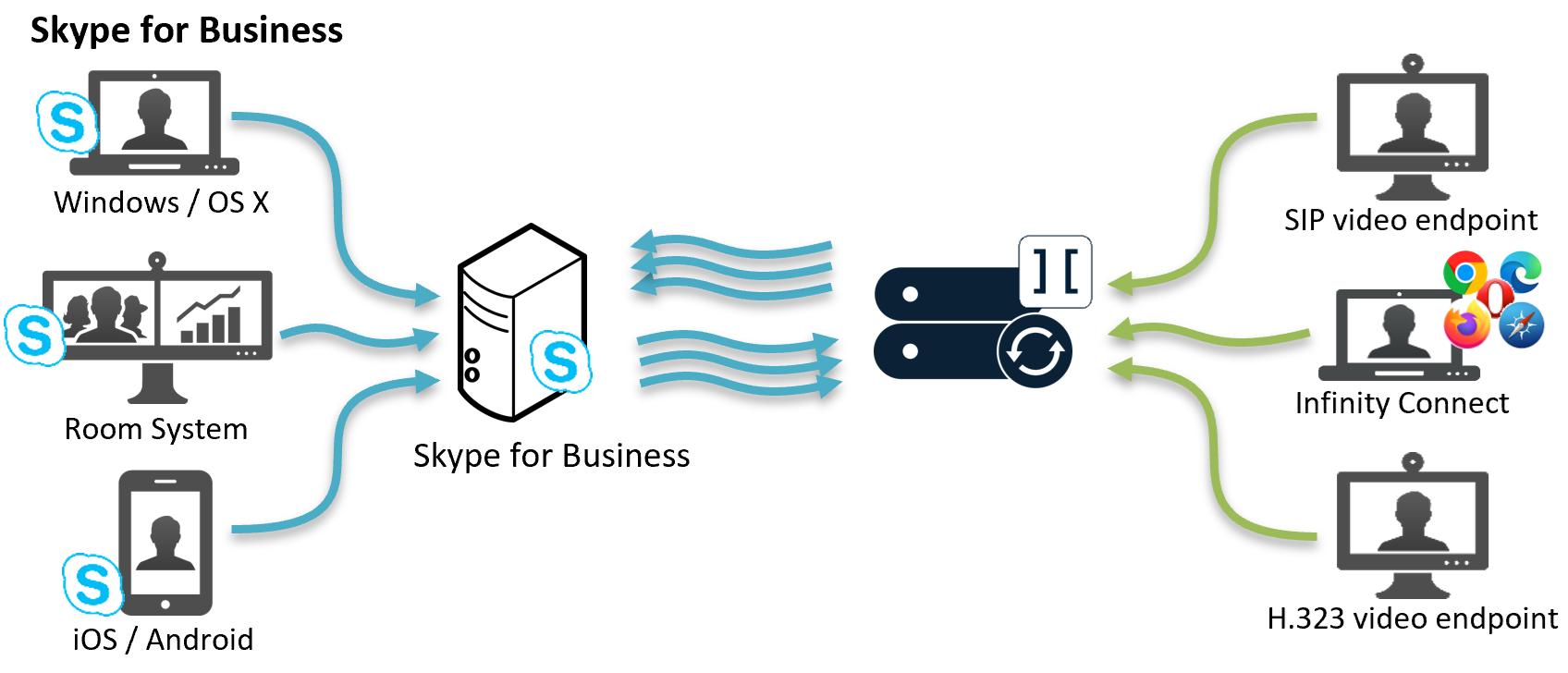
The Infinity Gateway is configured as a series of Call Routing Rules which specify which calls should be interworked and to where.
For information about to how configure the SfB gateway functionality, see Using Pexip Infinity as a Skype for Business gateway.
Simulcast from Pexip Infinity to Skype for Business AVMCU

Pexip Infinity can send the video streams of gateway participants at multiple resolutions to a SfB meeting hosted on the SfB AVMCU.
This means that if SfB clients request different video resolutions from the AVMCU, Pexip Infinity will support the equivalent request for that resolution from the AVMCU.
This optimizes the SfB user experience for all SfB meeting participants, and for all device sizes from a mobile client to the Microsoft Surface Hub.
When viewing the status of the backplane media streams via the Pexip Infinity Administrator interface, a separate stream is shown for every resolution currently being sent. This example shows 3 current simulcast streams:

Simulcast to SfB AVMCU is automatically enabled and requires no administrator configuration.
Multistreaming from Skype for Business AVMCU to Pexip Infinity
Pexip Infinity can receive multiple video streams from an AVMCU multi-party conference. This provides an enhanced conferencing experience for all participants connected to a SfB meeting:
- Participants in a Pexip VMR that has been merged with a SfB meeting see a combined set of Pexip VMR and SfB meeting participants.
- Participants connected to a SfB meeting via the Infinity Gateway see a full combined set of both SfB participants and any other Pexip gateway participants in the conference. They always see the default Pexip 1 +7 layout (large main speaker and up to 7 other participants), and at a resolution optimized for the participant's device, as shown below:

Note that:
-
There are always 6 video streams negotiated with the AVMCU, one in HD and the others at thumbnail resolution. However, no unnecessary resource capacity is used on Pexip Infinity if a stream is not active.
When viewing the status of the backplane media streams via the Pexip Infinity Administrator interface, each of the 6 negotiated media streams is shown. In this example, only 2 of the 6 streams are currently active:

- As the AVMCU can only send a maximum of 6 video streams, if more than 6 AVMCU participants are shown on the stage in a Pexip Infinity layout (as seen by Pexip VMR participants or a Pexip gateway participant), those additional AVMCU participants display as a broken camera.
- If a SfB client pauses video or puts its call with the SfB meeting on hold, that participant is represented by a frozen image.
- When an AVMCU participant is spotlighted, all other AVMCU participants switch to audio only:
- Pexip VMR participants see audio indicators instead of video for all of the other AVMCU participants, but still see video from other VMR participants.
- Pexip gateway participants see audio indicators instead of video for all other participants.
SfB AVMCU multistreaming is automatically enabled and requires no administrator configuration.
Supported codecs, protocols and resilience
Skype for Business clients may send resolutions up to 1080p to Pexip Infinity, depending on the camera capabilities and available bandwidth. RDP and VbSS presentation content is sent in a separate channel to main video. RDP is more bandwidth heavy than VbSS and it utilizes TCP, which is a poor choice for realtime media. RDP content is sent at the same resolution as the originating screen.
Skype for Business clients ask to receive content at a resolution based on the size of the window they are appearing in. For example, at smaller window sizes, the client will request video to be sent to it from Pexip Infinity at CIF (352x288) but as the size of the window expands, this can increase up to 1080p.
Supported codecs for calls between Pexip Infinity and Skype for Business:
- Video: H.264 UC and multistream H.264SVC (Skype for Business).
- Audio: G.722.
Desktop/application window sharing, RDP and VbSS:
- Desktop and single application windows can be shared from Skype for Business for Windows, and Skype for Business for Mac.
- Pexip Infinity supports bi-directional RDP. Skype for Business users can send and receive dual streams.
- Pexip Infinity supports Video-based Screen Sharing (VbSS). Pexip Infinity supports sending and receiving content via VbSS to and from Skype for Business meetings, and to and from Skype for Business clients that are either calling another endpoint via the Infinity Gateway, or calling into a Virtual Meeting Room. For information about enabling VbSS on your Skype for Business infrastructure see https://technet.microsoft.com/en-us/library/mt756736.aspx.
- When sending main video and presentation content to a Skype for Business client, the bandwidth is not shared (this applies to VbSS and RDP). The presentation stream is treated as a separate call and has the same bandwidth limit applied as the main video call.
Presenting PowerPoint files:
- Pexip Infinity supports the Persistent Shared Object Model (PSOM), and supports PowerPoint presentation from Windows Skype for Business clients.
- Participants that are connected to a Pexip VMR, or in a gateway call with a SfB client or SfB meeting, can see shared content if a SfB user presents PowerPoint files.
- Requires Office Web Apps (OWA) Server.
- Slide animation is not supported; Pexip participants will see a composite JPEG image. Also, annotations are not supported.
- Note that a SfB client's connection to a VMR or gateway participant is automatically escalated into a SfB meeting if the SfB client presents PowerPoint files.
Packet loss resiliency:
- Pexip Infinity supports send and receive video FEC (X-ULPFECUC) with Skype for Business clients and Skype for Business meetings.
- Pexip Infinity supports audio FEC (RED) for audio content sent to and received from Skype for Business clients and Skype for Business meetings.
Connectivity resilience:
- If the connection to a Skype for Business meeting is lost, Pexip Infinity attempts to re-establish the connection. Note that this does not apply to Pexip-hosted VMRs that have been merged into a SfB meeting.
Resource allocation rules and examples
The following rules determine how hardware resources are allocated and consumed by gateway calls involving SfB.
- For a gateway call to a Skype for Business meeting, the connection to SfB uses 1 HD of resource for main video and will use another 1 HD of resource if either side starts presenting. The resources required for the VTC leg of the connection depend upon the Maximum call quality setting.
- For non-distributed gateway calls involving a Skype for Business client, a backplane is reserved in case the SfB user starts presenting (as the RDP/VbSS presentation stream could connect to any Conferencing Node due to DNS). Each presentation stream counts as 1 HD port. Thus if the incoming RDP/VbSS call lands on the same node as the video call then the resource usage is equivalent to 3 HD ports (2 video + 1 presentation). If the RDP/VbSS call lands on a different node to the video call then the resource usage for the call is equivalent to 5 HD ports (2 video + 2 backplane + 1 presentation).
The following examples are designed to give you an idea of how the hardware resource allocation rules apply to SfB clients in gateway calls.
Non-distributed gateway call (standards-based endpoint to SfB client)
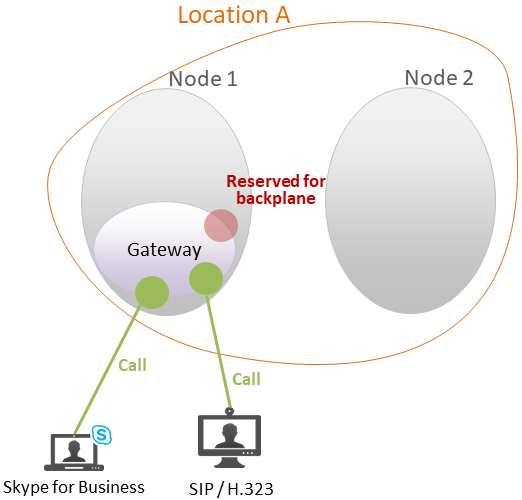
- There are multiple Conferencing Nodes in a single system location, but the gateway call is located on a single node.
- There is one standards-based endpoint connecting via the node to a SfB client.
- Each endpoint uses HD video and audio.
Pexip Infinityrequires 2 HD resources: 1 for the inbound leg (endpoint to Pexip Infinity) and 1 for the outbound leg (Pexip Infinity to recipient). It also reserves 1 HD resource for a presentation backplane (in case either participant starts sending presentation and it is handled on a different node), so a total of 3 HD resources are used (see diagram).
- If a presentation is sent from the standards-based endpoint, Pexip Infinity will use the 1 reserved HD resource for the SfB client to receive presentation.
-
If a presentation is sent from the SfB client, Pexip Infinity will use the 1 reserved HD resource for the SfB client to send presentation, and use an extra 0.5 HD resource for the standards-based endpoint to receive presentation.
However, if the RDP or VBSS presentation call from the SfB client lands on a different Conferencing Node to the video call, then the call will require an additional 2 HD resources (as a backplane is required in each direction between the node handling the video call and the node handling the presentation call, making 5 HD resources in total — 2 video + 2 backplane + 1 presentation).
The conference uses 2 concurrent call licenses in both cases.
Distributed gateway call (WebRTC to SfB client)
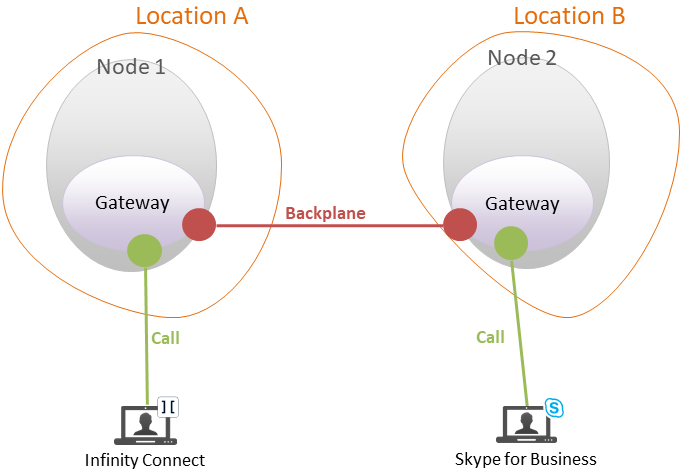
- There are two Conferencing Nodes in two different system locations.
- A gateway call is placed from a SfB client on node 2, to a WebRTC VP9
- Each endpoint uses HD video and audio.
Pexip Infinityrequires 4.25 HD resources: 2.25 HD on node 1 (1.25 for the connected participant and 1 for the backplane), and 2 HD on node 2 (1 for the connected participant and 1 for the backplane).
- A presentation (screensharing) is then sent from the Pexip desktop app to the SfB client.
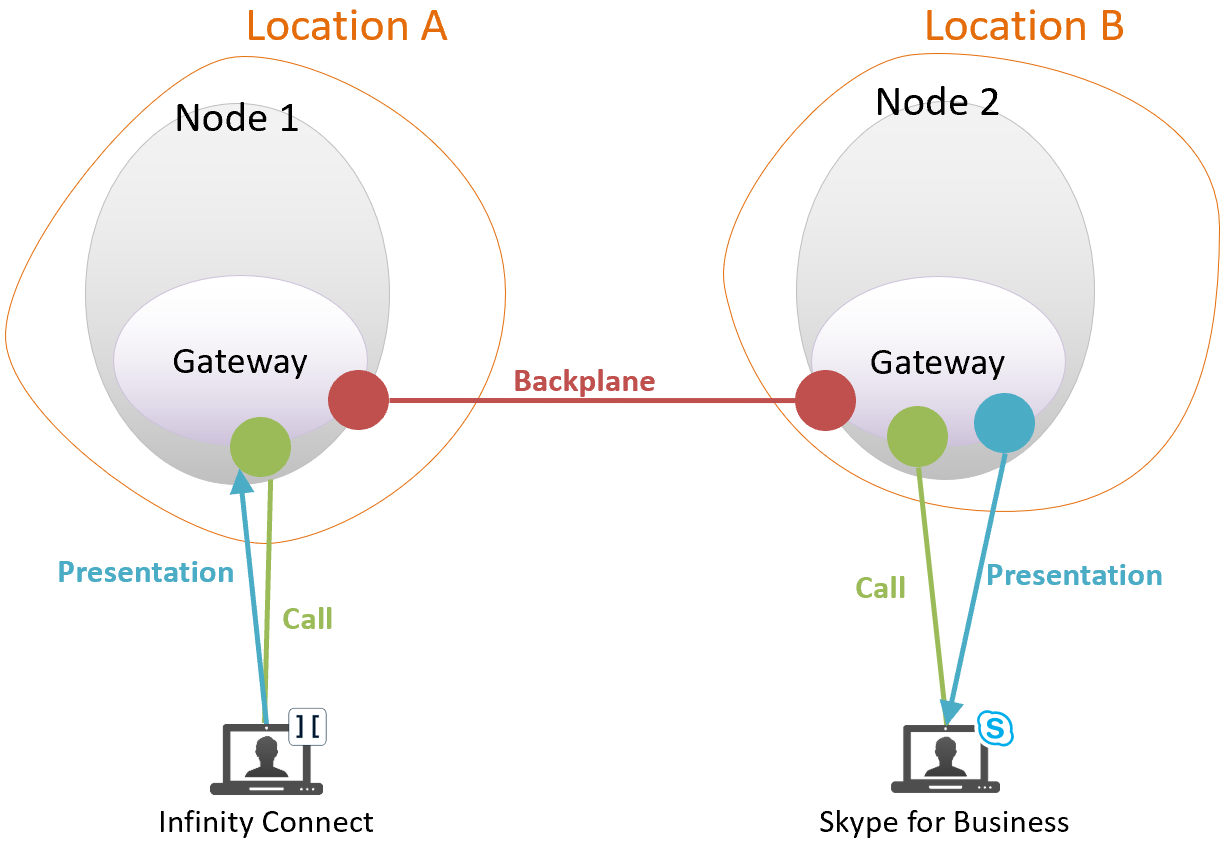
Pexip Infinity requires no additional resources for node 1 for the Pexip app to share its screen. However, it requires 1 additional HD resource on node 2 for the SfB client to receive presentation (a total of 3 HD resources on node 2).
If the SfB client was to send presentation rather than receive, we would still require the same 3 HD resources on node 2, and use an extra 0.5 HD resource on Node 1 for the standards-based endpoint to receive presentation.
In both cases, the conference uses 2 concurrent call licenses.
Single non-distributed gateway call to SfB meeting
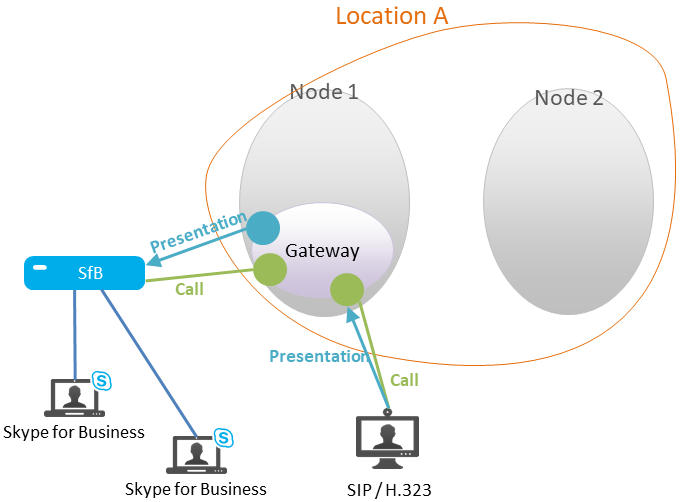
- There are multiple Conferencing Nodes in a single system location, but the gateway call is located on a single node.
- We have one standards-based endpoint connecting to a SfB meeting via the node.
- Two SfB clients are also connected directly to the SfB meeting.
- Each endpoint uses HD video and audio.
Pexip Infinityrequires 2 HD resources. The standards-based endpoint uses 1 HD resource, and the connection to the SfB meeting uses 1 HD resource.
- A presentation is then sent from the standards-based endpoint (see diagram).
Pexip Infinityrequires 1 additional HD resource for the SfB meeting to receive presentation, so a total of 3 HD resources are used.
The call uses 2 concurrent call licenses in both cases.
Controlling media capability
For general information see Controlling media capability. This section calls out the specific features that are related to SfB clients.
Virtual Receptions
Skype for Business clients making a call via an audio-only Virtual Reception will always join a video-capable VMR as audio-only initially, but with the option of enabling video.
Infinity Gateway calls
For calls made using the Distributed Gateway, you can configure the relevant Call Routing Rule to limit the media by selecting an appropriate Call capability setting. Note that, when using Same as incoming call:
- auto-escalation of Skype for Business calls (if enabled) will not work
- for an H.323 audio-only call to a Skype for Business client, the SfB client will be offered both audio and video.
Automatically escalating Skype for Business audio calls
You can control how Pexip Infinity handles incoming audio-only calls from SfB clients.
By default, Pexip Infinity treats the call as audio-only and does not send video back to the SfB participant.
This behavior can be changed on a platform-wide basis by selecting the Enable Skype for Business auto-escalation setting from .
When SfB auto-escalation is enabled, Pexip Infinity automatically escalates a SfB audio-only call so that it receives video from a conference (the SfB participant still only sends audio).
In all cases, the SfB participant can still subsequently escalate to send (and receive) video.
Limitations
The following are known limitations when integrating Pexip Infinity with Skype for Business:
- Pexip Infinity does not support direct federation with consumer Skype; it does support federation with Skype for Business.
- For an on-prem Pexip Infinity deployment, if there are any firewalls in between the SfB server and the Conferencing Nodes, or between the internal SfB clients and the Conferencing Nodes, these firewalls have to be configured to permit the relevant traffic (see Firewall ports for Skype for Business integrations).
-
There are some limitations with merging and escalating SfB meetings with PIN-protected Pexip conferences:
- When using drag and drop to merge a PIN-protected Pexip conference into a SfB meeting, you need to include the PIN in the SfB contact address using the format <vmr_alias>**<PIN>@<domain>. Note that this will make the PIN visible to other SfB meeting participants. You can only merge a locked Pexip conference into a SfB meeting if the Pexip conference is also PIN-protected.
- If a SfB client dials a PIN-protected VMR directly without the PIN in the URI, and then enters the PIN manually, it may not be able to present a PowerPoint file or escalate that call to a SfB meeting (e.g. by drag-and-dropping other SfB participants into the call). Presentation and escalation is always possible if the SfB client initially dials the VMR with the PIN in the URI.
- When a SfB mobile client is in a gateway call to another device, it cannot invite other external contacts into that call unless the SfB mobile client is already in an existing SfB meeting.
- PowerPoint presentation from SfB on Mac clients is not supported.
For further information and troubleshooting, see Troubleshooting and limitations with Skype for Business and Pexip Infinity integrations.